Your AI, observable.
Gateway optional.
Send request metrics from your existing backend, or route through HyperProxy to protect provider keys and apply gateway controls. Choose either mode, or use both in one project.
Send completed request metrics from your backend. No provider key needed.
Connect backend metrics → Gateway + analyticsShip an app key. Keep provider credentials off-device and apply gateway controls.
Proxy your first request → Swift SDKUse typed provider calls or generic transport for any public HTTPS API.
Install HyperProxySwift →Choose a task. Follow a complete guide.
Create a HyperProxy project, connect a provider, mint an app key and verify your first AI request with curl before integrating your app.
Swift · OpenAIIntegrate OpenAI in Swift with HyperProxySwift 0.5.0. Install the package, use a gateway app key, stream responses and verify usage in your dashboard.
iOS securityKeep full AI provider keys out of your iOS app. Configure HyperProxy split-key app keys, Apple identity, App Attest and request limits step by step.
Backend observabilitySend completed LLM request metrics from your backend to HyperProxy. Track tokens, cost, latency and clients using retry-safe external events.
OpenTelemetry · OTLP/HTTPConfigure an OTLP/HTTP exporter for HyperProxy LLM observability. Verify completed GenAI spans, ingest authentication, retry handling and batch limits.
Prompt operationsCreate a provider-native prompt template, preview typed variables, test a staging version and publish or roll back a production prompt in HyperProxy.
Swift · GeminiIntegrate Gemini in Swift with HyperProxySwift 0.5.0. Protect your provider key, send a native API request and verify tokens, costs and errors.
Swift · ClaudeIntegrate Claude in Swift with HyperProxySwift 0.5.0. Protect your provider key, send a native API request and verify tokens, costs and errors.
Latency & reliabilityUnderstand AI gateway latency, streaming duration and missing samples. Use HyperProxy request data and controlled comparisons to investigate slow LLM calls.
Proxy your first request
Create a service, mint an app key, then change only the request origin and authorization header.
- 1Create a project and service
Choose a provider preset or register any public HTTPS API. Store the real provider key once.
- 2Mint an app key
It is shown once. Embed it in the client; the complete provider key never ships.
- 3Send the provider-native request
Keep the upstream path and body unchanged. HyperProxy injects auth and streams the response.
URL and credential stay separate. The gateway URL selects the upstream. The app key proves access and supplies the client half. A key from another service is rejected.
Know what belongs where
Open a project and choose Configure → Project setup. This page gives you the setup order, current service configuration and a guide for each step.
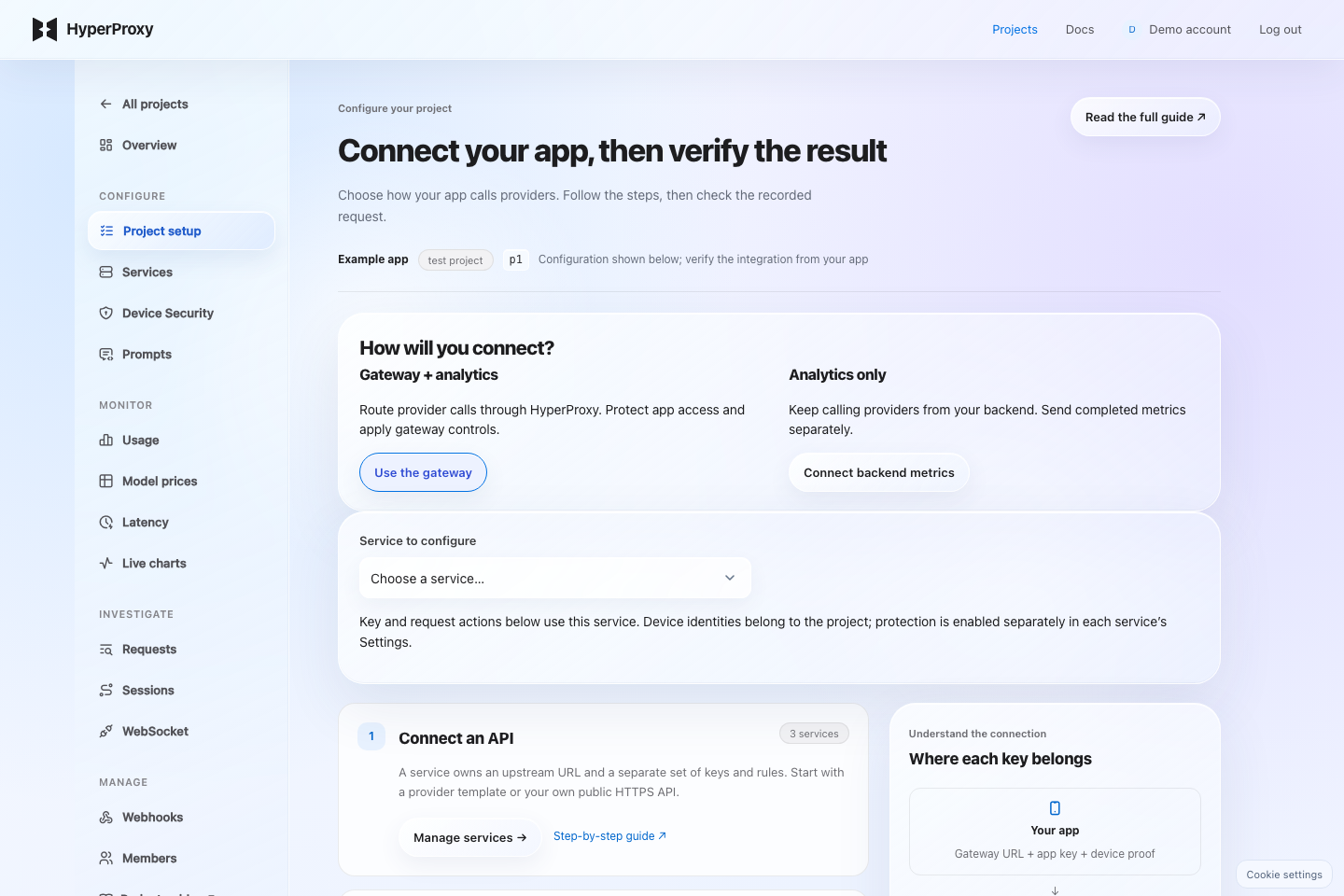
ConfigureProject setup, Services, Device Security and Prompts define how your app connects and what the gateway enforces.
MonitorUsage, Model prices, Latency and Live charts explain aggregate activity and estimated cost.
InvestigateRequests, Sessions and WebSocket show individual outcomes when an integration fails.
ManageWebhooks notify your backend. Members share dashboard access. Account billing remains separate and its allowance is shared across projects.
- 1Choose how to connect
For calls from your app through the gateway, continue with a service. For calls already made by your server, open Overview → Connect data → Analytics only and follow the ingestion guide; no provider credential is required.
- 2Configure service access
If the project has multiple services, choose Service to configure first. Open service keys and Build first request use this selected service. Mint an app key, configure the project identity, choose service protection, then restrict endpoints, models and request frequency.
- 3Verify before shipping
Send a real request from the app and open it in Requests. Inspect the status and selected service, then return to Project setup → Check recorded data. This checks retained project activity; inspect the request to identify your latest test. A saved identity or protection mode does not prove device verification succeeded.
Connect the upstream API
Each service has one gateway URL and its own credentials, device policy and traffic rules. Creating a service does not change another service.
- 1Add a service and choose a template
Open Services → Add new service. A template fills the upstream base URL, authentication scheme, static headers and suggested paths. For a custom API, enter its public HTTPS base URL yourself.
- 2Review the fields
Service slug identifies this service; Display name is its dashboard label. Proxy base URL is the provider destination. Authentication tells the gateway whether to inject a Bearer header, named header or query parameter.
- 3Choose initial access
Review Endpoint access and Device protection. Configure the matching project identity before enforcing proof. Leave API key override empty for ordinary split-key setup, then add provider keys under Keys.
- 4Create, copy and continue
Click Add new service, copy its Gateway URL and open the service. Mint an app key in Keys. Append the provider's request path to the gateway URL; the URL itself does not authorize a request.
Check: the service appears in Services with the expected upstream. Send the provider-native request through its gateway URL, then inspect Requests. A template is a starting configuration; it does not promise the provider account has access to every API operation.
Provider key, app key, device proof
These serve different purposes. The provider key authorizes the upstream API. The app key authorizes this gateway service. Device proof adds verification of your configured application.
Gateway URL
App key with client half
Matching device proof
Stored server half
Access and usage checks
Provider auth injection
Receives provider credential
Processes the request
Returns its response
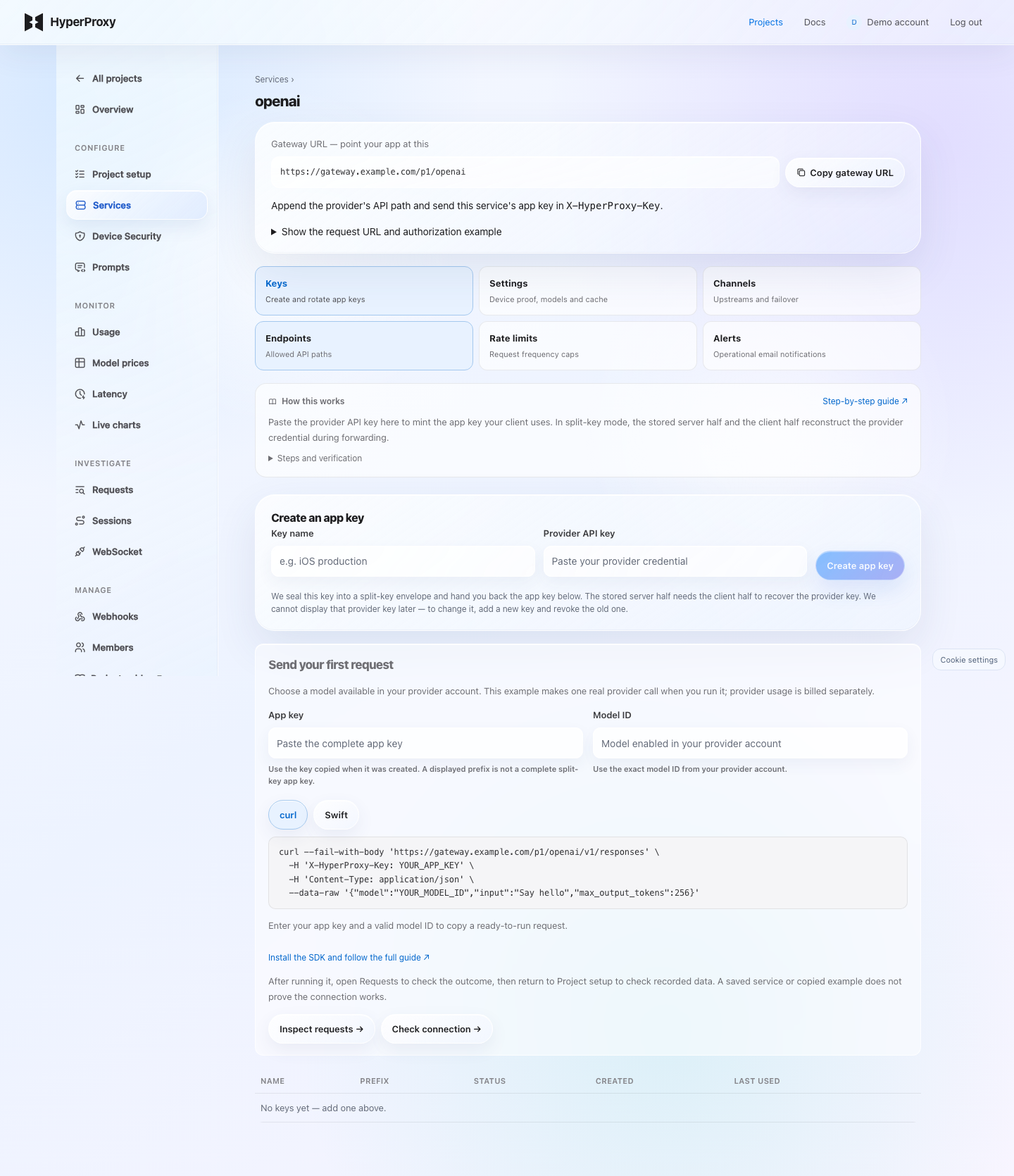
- 1Name and mint
Open Keys, give the key a useful name such as ios-production and paste the real provider API key. Click Create app key. In split-key mode, the server half requires the client half to recover that credential.
- 2Copy the app key once
Copy the full displayed value before leaving the page. Send it as
X-HyperProxy-Keyto this service's Gateway URL. Do not embed the real provider key or a server ingest key in the client. - 3Add protection and verify
An app key can be extracted from a distributed app. Configure device proof, endpoint/model access and rate limits, then check a real request. Split-key storage does not prevent all misuse of a copied client key.
- 4Rotate with a rollout window
Choose Rotate on an existing key, paste the provider credential again and select how long the old app key remains usable. Mint the replacement, ship it, then retire or revoke the old key after your rollout. Immediately ends its access without a grace period.
Send your first request: for OpenAI, Claude or Gemini, enter an exact model ID available in your provider account and choose curl or Swift. A newly minted key fills the example; returning to Keys requires your saved complete app key. Copy the request and run it from your terminal or app, then use Inspect requests and Check connection. Copying an example makes no provider call; running it incurs provider usage. Device-protected services show the matching protection guide instead of a plain curl command. Custom upstreams require their own API path and payload.
Shared key override changes the boundary. An override is encrypted at rest and used for every request to the service. An active app key is still required, but its client secret half is no longer verified: a displayed prefix is sufficient. Keep this distinction in mind when using Settings → API key override.
Keep the provider payload intact
Append the provider's path to the HyperProxy gateway URL. Replace the real credential with X-HyperProxy-Key.
$ curl -N "https://api.hyperproxyai.com/<project>/<service>/v1/chat/completions" \
  -H "X-HyperProxy-Key: hp_live_<project_id>.<key_id>.<client_half>" \
  -H "Content-Type: application/json" \
-d '{"model":"gpt-4o-mini","stream":true,"messages":[{"role":"user","content":"Hello"}]}'Two opaque segments select the project and service. They are identifiers, not credentials.
Native forwarding uses the provider's JSON, binary, SSE and WebSocket formats. Configured model, prompt or compatibility policies may update JSON fields.
The gateway reconstructs the provider key only in memory and injects the upstream auth scheme.
Add HyperProxySwift
Swift 6.2, iOS 15+, macOS 13+, visionOS 1+, and watchOS 9+.
dependencies: [
  .package(
    url: "https://github.com/Tsvihun/HyperProxySwift.git",
    .upToNextMinor(from: "0.5.0")
  )
]
Add the provider product your target uses, for example .product(name: "HyperProxyOpenAI", package: "HyperProxySwift"). The examples on this page use the published 0.5.0 API, available through Swift Package Manager or CocoaPods from the Git tag. The full 0.5.0 graph is not yet available in CocoaPods Trunk; use the Git instructions. Read the release changelog for catalog and API changes.
Before shipping. Review your app archive's privacy manifest and the SDK's provenance status. Use the release tag for reproducible builds.
Proxied mode
Use this for shipped mobile apps. The app receives only an app key; HyperProxy keeps the encrypted server half and reconstructs the credential per request.
import Foundation
import HyperProxyOpenAI

let gatewayURL = URL(string: "https://api.hyperproxyai.com/<project>/<service>")!
let appKey = "<app-key>"
let openAI = HyperProxy.openAI(gatewayURL: gatewayURL, appKey: appKey)

func requestGreeting() async throws -> String {
  let response = try await openAI.responsesCreate(
    OpenAIResponseRequest(input: "Hello", model: .gpt5)
  )
  var text = ""
  for item in response.output {
    guard case .outputMessage(let message) = item else { continue }
    for content in message.content {
      if case .outputTextContent(let part) = content { text += part.text }
    }
  }
  return text
}
Replace both placeholders with values from the same OpenAI service. Keep the client for reuse and call try await requestGreeting() from an async throws function or a Task that handles errors. Select a model enabled in your provider account; provider charges are separate from HyperProxy billing. This helper collects text from the response's typed output items. For refusals or tool calls, inspect their content kinds separately. Published SDK guide.
Direct provider mode
For development, migration, or a trusted backend where the host intentionally owns the provider credential. HyperProxy headers are never added.
Do not compile a long-lived provider key into a distributed mobile app. Proxied mode is the production path for client applications.
// Trusted server/tool environment only. Read the secret from its environment.
let providerKey = ProcessInfo.processInfo.environment["OPENAI_API_KEY"] ?? ""
let direct = HyperProxyClient.direct(
  baseURL: URL(string: "https://api.openai.com")!,
  defaultHeaders: ["Authorization": "Bearer \(providerKey)"]
)
let directOpenAI = HyperProxy.openAI(client: direct)Generic providers
Keep the same JSON, raw body, SSE, binary, and WebSocket transports for a provider that is not in the generated catalog.
let provider = HyperProxy.generic(gatewayURL: gatewayURL, appKey: appKey)
let response: HyperProxyJSONValue = try await provider.send(
  .post,
  path: "v1/generate", // replace with your provider's real path
  json: ["prompt": "Hello"] as HyperProxyJSONValue,
  decoding: HyperProxyJSONValue.self
)
Generic mode can also use .direct(baseURL:defaultHeaders:). No SDK release is required for a new provider path or payload field.
Stream, upload, poll, and connect in realtime
Typed provider calls and generic requests share the same transport layer. Use the response mode the upstream documents without flattening its payload.
Typed SSE and JSONLDocumented event streams have generated …Stream methods. Raw event and line streams remain available for preview APIs.
Multipart and progressSend images, audio, documents, and forms with upload progress; consume large binary responses incrementally.
WebSocket and realtimeOpen provider-native realtime sockets, exchange typed JSON or binary frames, and use the optional PCM16 capture/playback module.
Polling and paginationPoll asynchronous jobs with bounded policies and traverse cursor-based collections while keeping response metadata.
for try await chunk in try openAI.chatCompletionsCreateStream(
  OpenAICreateChatCompletionRequest(
    messages: [
      .chatCompletionRequestUserMessage(
        OpenAIChatCompletionRequestUserMessage(
          content: "Write one sentence",
          role: .user
        )
      )
    ],
    model: .gpt5,
    streamOptions: .init(includeUsage: true)
  )
) {
  print(chunk.choices.first?.delta.content ?? "", terminator: "")
}
includeUsage: true requests the final provider usage chunk for cost accounting. Keep it enabled for supported chat streams. Cancel the owning Task when the user leaves; update UI on its appropriate actor. Provider recipes.
DeviceCheck, App Attest, and App Check
Choose the proof required by each service. Security runs before provider forwarding and is separate from the app key.
- 1Configure the identity in Device Security
For App Attest, enter the Apple Team ID and app Bundle ID, choose the entitlement's environment, then Save identity. Live projects require Production; Development is available only in test projects. Changing identity or environment requires clients to enroll again.
- 2Complete the matching provider configuration
DeviceCheck needs the Apple-issued Key ID and .p8 private key; choose its production endpoint for TestFlight/App Store builds and Save DeviceCheck. The key is write-only; leave it blank to keep the existing one. Firebase needs the numeric project number and an explicit list of allowed Firebase App IDs; the client supplies a current App Check token. These are different fields from an Apple Team ID.
- 3Enable enforcement on the service
Open Services → your service → Settings and select the matching Device protection mode. The selection applies immediately. Saving the project identity alone does not turn on protection, and enabling it affects clients that do not send the proof.
- 4Match the SDK and test
Configure the same protection mode in your app. Test on a physical device and inspect Requests. For simulator testing, use a test project and a one-hour bypass in the Xcode scheme; live projects never accept it. Anyone with that bypass can skip Apple checks until it expires or is revoked.
Generate a fresh Apple proof per request for lightweight device validation and replay protection.
Attest once, then use a short-lived device token. No Apple round-trip is needed on every request.
Sign the method, URL, body, and routing controls in Secure Enclave. A monotonic counter rejects replay.
Require App Check tokens for Android, Apple, or web clients when Firebase owns application attestation.
let appAttest = HyperProxyAppAttest(
  projectID: "<project-public-id>",
  gatewayURL: gatewayURL
)
let protectedOpenAI = HyperProxy.openAI(
  gatewayURL: gatewayURL,
  appKey: appKey,
  security: appAttest.security(mode: .deviceToken)
)
Set the same Apple Team ID and bundle ID in the project and signed app, then select the matching service protection mode. Validate on a physical device. Live projects require production App Attest; development signatures use a test project. For the simulator, mint an expiring test-project bypass and keep it in the Xcode scheme, never in source. Assertion mode is HTTP-only; use DeviceCheck or device-token mode for WebSockets. Device verification guide.
Route deliberately. Retry safely.
Attach multiple provider channels to one service, keep cache-sensitive sessions on the same channel, and make fallback policy explicit.
- 1Add an upstream channel
Open Services → your service → Channels. Enter its name, public HTTPS base URL and credential. Priority orders candidates; weight distributes traffic within a priority. Configure the optional probe path and interval if you want automatic health probes.
- 2Save routing policy
Model aliases map your app's names to provider model IDs. Model fallbacks are ordered alternatives. Compatibility mode selects native transit or supported OpenAI-format adaptation. Set circuit failure threshold and cooldown, then Save routing policy. Keep non-idempotent retry disabled unless duplicate work is an accepted risk.
- 3Preview and verify
Use the route preview to inspect selection without a model call, then send a request from your app. Review channel health events and the request's actual routing. A preview does not establish provider permissions or credential validity.
Request templates are managed under Prompts. The advanced legacy presets section edits those same saved templates; it is not a separate routing policy.
Aliases and fallbacksMap a stable application model name to an upstream model and configure ordered fallback models for retryable 429/5xx failures.
Session affinitySend a session identifier to keep a conversation on one healthy channel so provider prompt caches can hit.
Circuit breakersRepeated channel failures open a circuit; probes restore traffic after recovery. Channel events remain visible in the dashboard and webhooks.
Non-idempotent safetyAutomatic failover does not replay non-idempotent generation requests unless you explicitly enable that risk for the service.
let response = try await openAI
  .call(.chatCompletionsCreate)
  .session("chat-42")
  .modelFallbacks(["gpt-5-mini", "gpt-4o"])
  .json([
    "model": "gpt-5",
    "messages": [["role": "user", "content": "Hello"]],
  ] as HyperProxyJSONValue)
.decodedWithMetadata(OpenAICreateChatCompletionResponse.self)Limits, allowlists, and rotation
Endpoint allowlistsRestrict each service to explicit upstream paths or allow every endpoint.
Granular limitsApply per-key, per-IP, or per-device rules with clear retry guidance.
Named app keysSegment, rotate with a grace period, or revoke keys per app version. Rotation re-seals the provider key you paste again; the old key keeps working until the window you choose ends.
Model policyAllowlist the models a service may call, or pin every request to one model so a leaked key cannot reach a pricier one. Refusals answer 403 model_not_allowed before anything is counted; a pin is reported in X-HyperProxy-Served-Model.
Response cacheOpt in per service: response bodies are stored in Redis until the TTL expires (up to seven days, including after project deletion). Keep the cache off for responses you do not want retained. Identical non-streaming JSON requests within the TTL are answered from the gateway (X-HyperProxy-Cache: HIT) with no provider call or cost. Streams, errors, requests over 64 KiB, and responses over 256 KiB are never cached; send Cache-Control: no-cache to bypass.
Failure alertsReceive an email after a configured run of upstream failures.
Understand every service setting
- 1Prepare identity, then select proof
Configure Device Security and your app's SDK before selecting a protection mode. That selection applies immediately and can reject clients without the matching proof.
- 2Review model and cache policy
Set Allowed models, Pinned model and Response cache, then click Save model policy. Read the field descriptions below before applying them.
- 3Verify the resulting requests
Keep the ordinary split-key setup unless you intend to use a shared key override. Send a test call, then inspect its model, status and cache header. Saving settings alone does not validate the upstream credential.
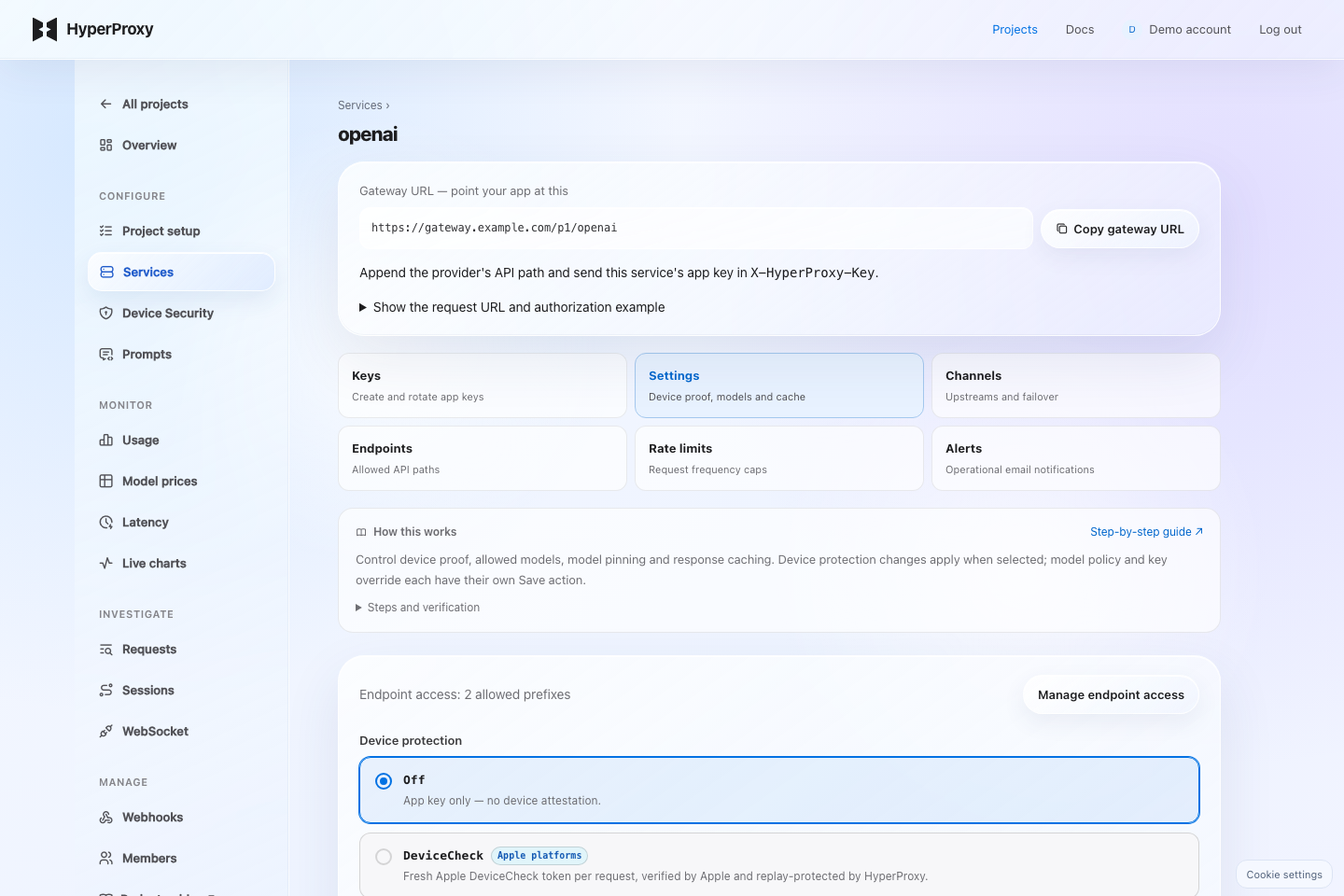
Endpoint accessA summary and link to the Endpoints section. Allowed path prefixes are separate from model names and device identity.
Device protectionOff uses app-key access alone. DeviceCheck verifies Apple tokens. App Attest token checks an enrolled device token; assertion checks a fresh signed HTTP request. Firebase App Check verifies a token for an allowed app. Selecting a mode applies it immediately. Configure Device Security and the matching app first.
Allowed modelsComma-separated provider model IDs; empty permits any model. Requests outside the list are rejected. Pinned model replaces the client's selected model; leave empty to remove a pin. Ensure the pinned model is compatible with the allowlist and provider.
Response cacheOff makes eligible requests call the provider normally. A selected TTL retains eligible response bodies in Redis and can answer identical requests without another provider call. Streams and errors are excluded. Set it to Off for content you do not want retained. Click Save model policy to save the model fields and TTL together.
API key overrideAn optional shared provider credential. Save updates it; Clear removes it. This disables split-key secret verification while still requiring an active app-key identity. Clearing it requires the client keys to carry usable split-key halves. Do not use the empty password field to infer whether an override exists.
Check: use a test integration to send requests with the intended model and proof. Requests shows rejections and the served model. For cache checks, inspect X-HyperProxy-Cache; a stored policy is not a successful provider/device test.
Choose the paths clients can call
- 1Choose restricted access
Turn off Allow all paths. While it is on, a saved list is kept but not enforced.
- 2Add prefixes, not URLs
Enter one relative path per field. For example,
v1/chat/completionsorv1/images/. A leading slash is optional. Matching uses the start of the path, sov1/permits everything below it. Wildcards, query strings and complete URLs are not accepted. - 3Preview and save
Expand Check a request path and try a path you want allowed and one you want excluded. This checks path matching only. Fix highlighted fields and click Save endpoint access. A restricted empty list blocks all paths.
- 4Verify from the app
Send one allowed and one excluded request with otherwise valid credentials. The excluded path should be refused before provider forwarding. Look up both outcomes in Requests.
Cap request frequency
- 1Pick the scope
keyshares a bucket per app key;ipper source IP.deviceuses a verified App Attest key; without it, including DeviceCheck, Firebase and bypass calls, it uses the app-key bucket. A client ID is an analytics label, not trusted device identity. - 2Set count and window
For 100 requests per hour, enter maximum requests
100and window3600seconds, then Add. Applicable rules are checked together; adding a rule does not replace others. - 3Verify with controlled test traffic
Use a test service and a small limit to check the rejection and retry guidance. Restore the intended limit before real traffic. Rate limits are separate from the account's monthly allowance.
Notify the right person
- 1Choose the event
Request failure streak uses a threshold of consecutive non-200 outcomes. Circuit opened / recovered reports channel-health transitions and does not need a streak threshold.
- 2Add a recipient
Enter the email that should receive the operational notification, set the streak threshold if needed, then click Add. The rule is displayed below the form.
- 3Check the outcome
Review the rule's last triggered time and inspect related requests or channel events. Notifications do not themselves repair a provider or block traffic. Use Webhooks for a backend receiver.
Verify a configuration change
- 1Send a test request and find it
Filter by period, provider, model, client or status. Refresh after your test and use the request ID to identify the exact call.
- 2Open request details
Inspect HTTP status and error, selected service/channel, duration, token/cost coverage and any resolved prompt slug, version or environment. Missing recorded fields do not prove the provider did not use that feature.
- 3Change the matching setting and retry
For an access failure check Keys, Device Security and Endpoints; for model policy check Settings; for upstream failover check Channels. Compare the new request after applying the change. Analytics-only events describe the outcomes your server reports.
History reflects retained records. An empty filtered table can mean no matching traffic or expired retention. It does not prove the connection is configured correctly.
Follow related requests
- 1Label related app requests
Send the same
X-HyperProxy-Sessionvalue with calls in one workflow or conversation. Use separate IDs for unrelated sessions. - 2Open the recorded session
Select the period and session. The timeline shows retained requests and their timing within the displayed page; older pages contain earlier calls.
- 3Inspect an individual failure
Open its request details to see the status, routing and usage. A session ID supports tracing and affinity; it is not user authentication or a trusted device identity.
Check a persistent connection
- 1Connect through the service
Use its WebSocket gateway URL and app key, following the transport guide. Query-string credentials can be exposed by URL logging; keep them out of shared logs.
- 2Match device protection
The service still enforces its configured proof. App Attest assertion is HTTP-only; use a supported device-token mode, DeviceCheck or Firebase integration for the connection.
- 3Inspect bytes and close codes
Filter by time and provider, then inspect start/end time, transferred bytes and close code. A missing end or close code can indicate an active connection or incomplete recording; it is not a success check by itself.
Errors, quotas, and close codes
Provider errors pass through unchanged. When the gateway refuses a request it answers with {"detail": {"error": "<code>", …}} (or a bare {"detail": "<code>"}) and, on WebSockets, closes with an application code whose reason is the same string. The SDK decodes both into HyperProxyGatewayRejection. Read HyperProxyError.gatewayRejection for HTTP and HyperProxyWebSocketError.gatewayRejected for WebSockets. Status codes, headers and the original provider error body remain available.
| HTTP | WS close | Code | Meaning |
|---|---|---|---|
| 429 | 4029 | plan_quota_exceeded | Monthly allowance used; the response reports limit, the effective cap, and period_resets_at. Account > Usage-based billing controls whether paid plans can continue after included usage. Turning it off stops new requests at the included limit; already accrued charges remain payable. Free plans always stop at the included limit. |
| 429 | 4029 | budget_exceeded | The project's enforced spend budget is reached (monthly_budget_usd). |
| 429 | 4029 | budget_accounting_incomplete · budget_pricing_unavailable | A hard budget cannot be proven safe: recent costs are still settling, or the model has no known price. |
| 429 | 4429 | rate_limited | Per-key, per-IP, or per-device limit; scope names which. Honour Retry-After. |
| 401 | 4001 | missing_or_invalid_app_key · unknown_or_revoked_key · expired_key · unknown_or_inactive_project | The app key is malformed, revoked, retired after a rotation grace period, or its project is gone. Ship a build with a current key. |
| 403 | 4003 | key_service_mismatch · forbidden_path · account_suspended | The key belongs to another service, the path is outside the allowlist, or the account is suspended. |
| 404 | 4004 | unknown_service | The URL names a service the project does not have. |
| 502 / 503 | 4502 / 4503 | upstream_unreachable · all_channels_unavailable | No upstream could be reached; transient — retry with backoff. |
Quota, budget, and key refusals do not clear by retrying; an opt-in HyperProxyRetryPolicy skips them automatically. Streaming and WebSocket calls are never retried automatically. Full table in the SDK guide.
Invite your team
- 1Invite a teammate
Open Manage → Members. Enter their email and choose Admin for project changes or Viewer for read access. Project ownership remains with the owner.
- 2Accept with the matching account
The recipient opens the invitation and signs into the account matching its email. Pending invitations and their expiry remain visible to administrators.
- 3Review access
Inspect active members and pending invitations when team access changes. Dashboard membership does not mint an app key or grant provider credentials to a client.
Under Members the project owner invites teammates by email as admin (configure services, keys, prompts, limits, webhooks) or viewer (read-only analytics and configuration). Invitations are bound to the invited address and expire after 7 days; the invitee signs in — or registers — with that email and accepts. Billing, team management, and deleting the project stay with the owner, whose account carries the plan and its request allowance. Members see shared projects on their own project list with their role.
Webhooks: quota, budget, and channel events
- 1Register your receiver
Open Manage → Webhooks. Add a public HTTPS endpoint and the event types your backend needs. Webhooks send outgoing notifications; external metrics are ingested separately.
- 2Verify signatures on the server
Keep the displayed signing secret on your backend and verify the timestamp and raw request body with the examples below. Do not put this secret in a mobile app.
- 3Inspect delivery
After a subscribed event, check delivery attempts, status and retry information in the dashboard. Use idempotent processing at your receiver because notifications may be retried.
Add an endpoint under Webhooks in a project to have the gateway push events to your own systems, or paste a Slack incoming-webhook URL to get a ready-made message. Events: quota.warning (80%), quota.exhausted, overage.scheduled, budget.warning, budget.exhausted, spend.anomaly, channel.down, channel.recovered, key.retiring, and webhook.test.
POST https://example.com/hyperproxy/webhook
Content-Type: application/json
X-HyperProxy-Event: quota.warning
X-HyperProxy-Delivery: 5f1c…            # unique per delivery; retries reuse it
X-HyperProxy-Signature: t=1789376400,v1=9a3f…

{"id":"5f1c…","type":"quota.warning","created_at":"2026-09-14T09:00:00+00:00",
 "project":{"public_id":"12c956b58d77ccdd","name":"Production API"},
 "data":{"plan":"pro","requests_used":80800,"included_requests":101000,
         "request_cap":202000,"period_resets_at":"2026-10-01T00:00:00+00:00"}}
The header/body above are illustrative; a real signature has 64 hexadecimal characters. Read the untouched request bytes before any JSON parser. Verify v1 as HMAC-SHA256 over <t>.<raw body> with the secret shown when the webhook was created, and reject timestamps older than a few minutes:
import hmac, hashlib, re, time
def verify(secret: str, header: str, body: bytes) -> bool:
    if not isinstance(header, str):
        return False
    try:
        parts = dict(p.split("=", 1) for p in header.split(",") if "=" in p)
        timestamp = int(parts["t"])
        signature = parts["v1"]
    except (KeyError, ValueError):
        return False
    if not re.fullmatch(r"[a-f0-9]{64}", signature):
        return False
    if abs(time.time() - timestamp) > 300:
        return False
    expected = hmac.new(secret.encode(), f"{timestamp}.".encode() + body, hashlib.sha256).hexdigest()
    return hmac.compare_digest(expected, signature)
import { createHmac, timingSafeEqual } from "node:crypto";
export function verify(secret, header, rawBody) {
if (typeof header !== "string" || !Buffer.isBuffer(rawBody)) return false;
const parts = Object.fromEntries(header.split(",").filter((p) => p.includes("=")).map((p) => p.split("=", 2)));
const timestamp = Number(parts.t);
const signature = parts.v1;
if (!Number.isSafeInteger(timestamp) || typeof signature !== "string") return false;
if (!/^[a-f0-9]{64}$/i.test(signature)) return false;
if (Math.abs(Date.now() / 1000 - timestamp) > 300) return false;
const expected = createHmac("sha256", secret).update(`${timestamp}.`).update(rawBody).digest("hex");
const expectedBytes = Buffer.from(expected, "hex");
const signatureBytes = Buffer.from(signature, "hex");
return signature.length === 64
&& signatureBytes.length === expectedBytes.length
&& timingSafeEqual(expectedBytes, signatureBytes);
}Answer with any 2xx within 10 seconds. Other responses and connection errors are retried after 1 min, 5 min, 30 min, 2 h, and 6 h, then the delivery is marked dead; a 410 Gone stops retries immediately. Endpoints must be public https origins — private and link-local addresses are refused at creation and re-checked on every send. Deliveries and their status are listed per webhook in the dashboard, and Send test queues a webhook.test event.
Connect OpenTelemetry
Send completed LLM metrics from your backend with an OTLP/HTTP trace exporter. Create a project key with ingest permission in Server API access, then configure:
OTEL_EXPORTER_OTLP_TRACES_ENDPOINT=https://app.hyperproxyai.com/api/v1/admin/projects/PROJECT_ID/v1/traces
OTEL_EXPORTER_OTLP_TRACES_PROTOCOL=http/protobuf
OTEL_EXPORTER_OTLP_TRACES_HEADERS="Authorization=Bearer hp_obs_YOUR_SERVER_TOKEN,User-Agent=YourAppTelemetry/1.0"
OTEL_BSP_MAX_EXPORT_BATCH_SIZE=512
Supports HTTP protobuf and JSON, including gzip. Use completed GenAI CLIENT spans with provider, model, input and output token attributes. Trace IDs group sessions; retries with the same span IDs do not duplicate metrics or quota. Limits: 512 spans and 2 MiB per batch, 600 submissions per project per minute.
This adapter collects LLM metrics. It does not store prompt bodies, arbitrary span attributes or general application traces. Unsupported spans receive OTLP partial-success counts. Export each AI call through one path: a gateway request exported again as an external span would count twice.
Keep the ingest key on your backend. Do not embed it in a mobile or browser app. Explore usage and cost reporting
Keep your backend. Connect analytics.
Your backend calls AI providers directly. HyperProxy receives completed request metrics separately; provider keys, prompts and response bodies are not part of this API.
- Create a project and open Overview → Set up analytics.
- Create a key with Send external events only. Keep it on your server.
- Send one event per completed provider call. Use a background worker or queue so telemetry failures do not delay or fail the AI response.
import os, uuid, json
from urllib.request import Request, urlopen
from datetime import datetime, timezone

# Submit from your background worker after a completed call.
event = {
    "event_id": str(uuid.uuid4()),  # persist and reuse this ID for retries
    "occurred_at": datetime.now(timezone.utc).isoformat(),
    "provider": "openai",
    "model": "gpt-4o-mini",
    "status_code": 200,
    "duration_ms": 320,
    "tokens_in": 1000,  # use the actual provider usage totals
    "tokens_out": 500,
    "client_id": "customer-123",
    "session_id": "conversation-456"
}
req = Request(
    "https://app.hyperproxyai.com/api/v1/admin/projects/"
    + os.environ["HYPERPROXY_PROJECT_ID"] + "/events",
    data=json.dumps(event).encode(),
    headers={
        "Authorization": "Bearer " + os.environ["HYPERPROXY_INGEST_TOKEN"],
        "Content-Type": "application/json",
        "User-Agent": "HyperProxy-Telemetry/1.0"
    }, method="POST"
)
with urlopen(req, timeout=3) as response:
    receipt = json.load(response)
Accepted events return 201 with a request ID; repeated event IDs return 200 without adding usage or consuming another request. A retry must keep the same event ID and payload. Use the returned request ID for annotations with a separate write-scoped token.
Omit both token totals when unavailable. Cost is estimated from the model catalog or your price overrides; missing usage or pricing stays unknown. External events are labelled as server-reported and can be filtered separately in Overview.
Accepted events consume the shared monthly request allowance when received, including failed provider calls. Rate limit: 600 submissions per minute per project. Events can be up to 30 days old or 5 minutes in the future. Use backoff for transient rate limits and 5xx; a monthly quota refusal requires available allowance. Keep pending events in your own durable queue if delivery must survive a process restart.
Gateway features — key protection, request limits, fallbacks, App Attest and runtime prompt injection — apply only to requests routed through HyperProxy. Analytics-only mode cannot enforce them on direct provider calls. Send either gateway telemetry or an external event for a call, not both.
Request details separate ordinary tokens, cache reads, 5-minute and 1-hour cache writes, and reported audio/image/video tokens. Missing prices or ambiguous cache details are marked as incomplete cost. Standard token estimates exclude storage and tool fees. Custom rates can be supplied through the project price override API.
OpenAI background Responses stay pending until you retrieve final usage through the same gateway service. Repeated status checks settle the original generation once, using its original price and billing month. Polls still consume request quota. HyperProxy does not store a complete split key or poll providers autonomously.
Requests, tokens, dollars
Meter request count, input and output tokens, latency, success rate, and estimated model cost by project and model.
Read recorded usage and cost
- 1Select the traffic
Choose the period and filters for provider, model or client. Gateway requests and external events reflect different connections; narrow the data source when comparing them.
- 2Inspect requests, tokens and coverage
Review totals and model/provider breakdowns. Cost is estimated from recorded usage and catalog rates; incomplete pricing remains marked. Provider spend is separate from your HyperProxy subscription.
- 3Check a contributing request
Open Requests with matching filters and inspect token categories and recorded cost. Chart filters do not change the account's monthly allowance, which is shared across its projects.
Check the estimate's rates
- 1Find the exact model
Search the provider/model catalog for the ID used by your request. A similar display name may have a different price.
- 2Read units and categories
Compare input, output, cache and media rates where available. An absent rate does not mean free usage. A listed price does not grant your provider account access to that model.
- 3Inspect coverage in Requests
Check whether the provider returned the usage details needed for that rate. Estimates can exclude tools, storage or other fees; compare your provider invoice when reconciling actual billing.
What AI gateway latency measures
A request's recorded duration is not the same as gateway overhead. Separate provider processing, response streaming and the client network before deciding which part of an AI call is slow.
What the latency numbers measure
- Gateway request duration: recorded server-side time for the routed request, including provider work and response transfer. For streamed calls, final metering happens after the stream finishes or stops.
- External event duration: the
duration_msyour backend or supported completed GenAI span reports. Its measurement boundary is owned by the sender. - First response byte: request detail metadata can include
first_byte_mswhen the gateway observes a non-empty response body. That byte may be stream metadata, not the first generated token. - Gateway overhead: extra time attributable to routing through the gateway. Use a controlled direct-versus-gateway benchmark to estimate it; the average duration chart measures the whole request.
Investigate the same traffic across screens
- 1Choose a representative period
Start in Overview and select the provider, model or traffic source you want to investigate. Check the latency sample count as well as the average. A broad average can mix short JSON calls with long generations.
- 2Compare duration, failures and model usage
Use Latency and Usage with the same period, then narrow Requests by the model or status involved. These are measurements of recorded traffic, not provider-wide benchmarks. Periods and chart buckets use UTC.
- 3Inspect individual requests
Open the corresponding request to check status, duration and routing or fallback outcome. A fast rejected request should not be compared with a successful long stream as evidence of generation speed.
Unknown is different from zero
A dash or No latency samples means the selected traffic has no recorded duration. It does not mean the gateway added zero milliseconds. A measured 0 ms remains a valid recorded value at millisecond precision. Missing values are excluded from averages, and empty chart intervals are gaps, not zero-duration requests.
How to benchmark gateway overhead
From the same client and region, compare direct-provider and gateway calls using the same provider account, model ID, payload, output limit and streaming mode. Run warm-up calls, alternate the two paths and collect enough samples to compare their distributions. Keep errors and retries separate. Provider calls in both paths incur provider usage.
Measure time to first response byte and total completion time separately at the client. For streaming, also measure time to the first generated token in your application. A gateway-minus-direct difference is an estimate under those test conditions; provider load, network variation and connection reuse can change it. Calculate any p50 or p95 from those samples; the Latency page displays averages, not percentiles.
For an existing backend, send completed-call metrics or use OpenTelemetry ingestion. Keep measurement boundaries consistent before combining sources.
Watch a test as it happens
- 1Open the live view
Keep the page open while sending calls through this project or reporting completed server events.
- 2Match the recent activity
Compare the visible request rate, errors and latency with your test. No recent points can mean no traffic in the current window.
- 3Confirm the retained record
Open Requests to inspect the exact outcome and error. Use Usage and Overview for historical reporting beyond the live window.
Test a prompt. Publish it. Roll back.
Connect your app to a named prompt environment once, then change its saved version from the dashboard without another app release.
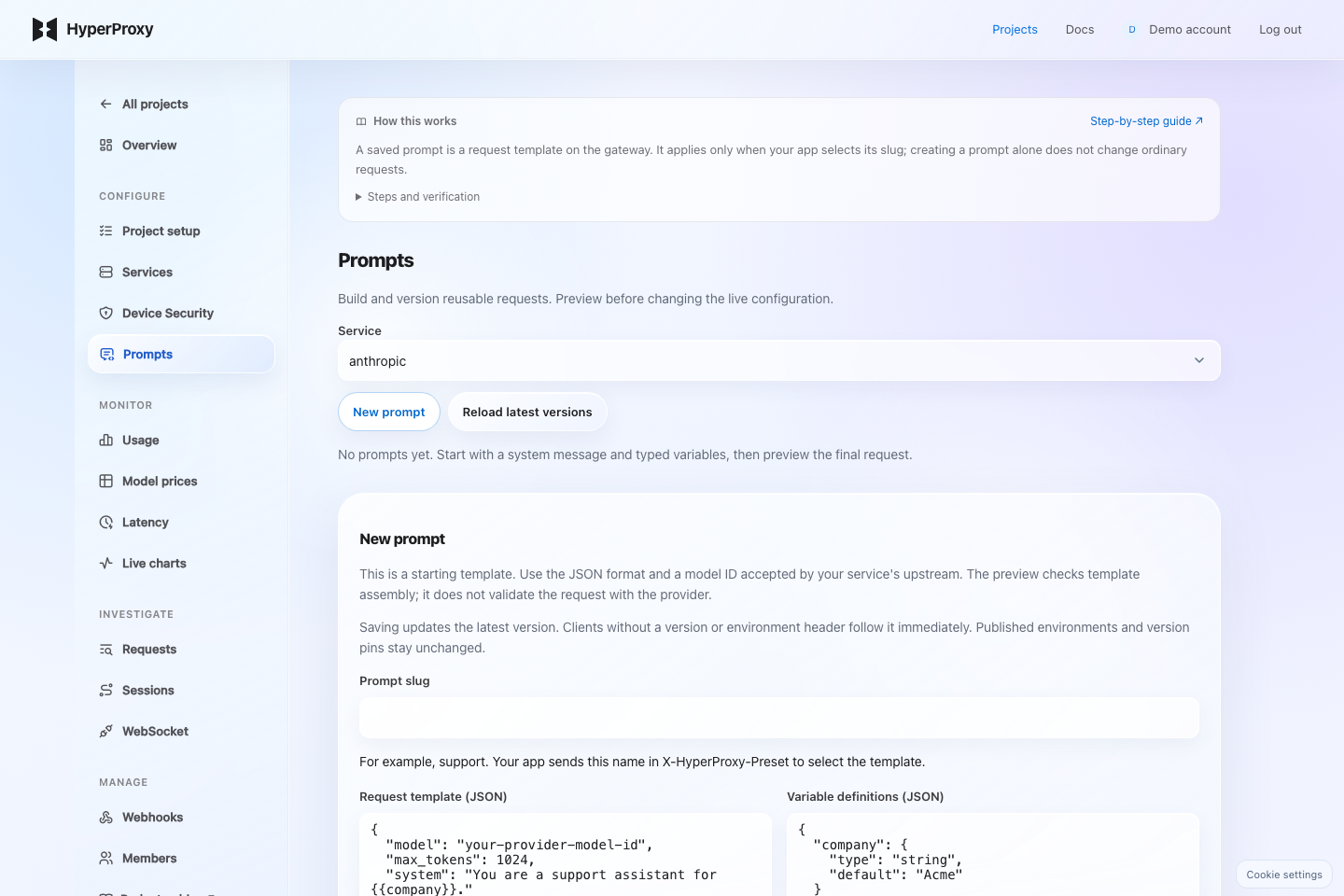
Service and prompt slugSelect the service receiving the request. The slug is the name your app selects in X-HyperProxy-Preset; creating a prompt alone does not affect requests without a selector.
Request templateEnter a JSON object matching this provider's API, with its real model ID. OpenAI-compatible APIs use a messages array; Anthropic uses a separate system field and max_tokens; Gemini uses contents and systemInstruction. Custom and media APIs need their own JSON fields.
Variable definitionsDefine each {{name}} with its type and optional default. For example {"company":{"type":"string","default":"Acme"}}. Variables without defaults are required. Arrays and objects must replace an entire value. Empty definitions leave placeholders literal.
Message handling and ActiveAppend places template messages before client messages; Replace substitutes the template messages. This affects the messages array only, not Gemini contents. Other template fields override client fields. Turning Active off also prevents pinned versions from being used.
Input values and Client requestInput values fill variables, for example {"company":"Acme"}. Client request is the JSON your app would send. Preview assembled request shows the merge without generating a model response.
- 1Save and preview
Open Project → Prompts. Define a JSON request template and typed variables. Preview the assembled request without calling a model.
- 2Verify in staging
Publish a saved version to staging. Send test requests using the environment header below. Model requests consume normal provider usage; assembly preview is free.
- 3Publish to production
Select that saved version for production. Later template edits do not move this environment. To roll back, publish an earlier version. Every switch records its actor, time and release note.
X-HyperProxy-Key: <your-app-key>
X-HyperProxy-Preset: support
X-HyperProxy-Preset-Environment: production
X-HyperProxy-Prompt-Variables: {"company":"Acme"}
Use either an environment header or X-HyperProxy-Preset-Version. Without either selector, existing clients follow the latest saved version. Missing environments fail explicitly. Environment names select versions within a service; they are not separate access permissions.
Typed variables support string, number, integer, boolean, array and object. The saved template takes precedence over client fields. Select append mode to place template messages before client messages. Request details record the environment and resolved version.
Start typed or stay generic
Presets configure the provider origin and auth scheme. The SDK ships 18 typed provider families; xAI, Novita, and Z.ai are gateway presets, while generic mode covers every other public HTTPS API.



Run the data plane yourself
The same gateway ships as a Docker image with a PostgreSQL and Redis dependency and a one-command migration step; the SDK points at your host through gatewayURL. Source access is granted at no charge on request — tell us about your deployment and we reply within a business day with the image, the runbook, and the licence.