Send your first AI gateway request
Start with a single provider and a curl request. Once the response and request receipt are correct, move the same gateway URL and app key into your application. You need an active provider account and its API key; provider usage is billed separately.
Updated · HyperProxy team
Proxy your first request
Create a service, mint an app key, then change only the request origin and authorization header.
- 1Create a project and service
Choose a provider preset or register any public HTTPS API. Store the real provider key once.
- 2Mint an app key
It is shown once. Embed it in the client; the complete provider key never ships.
- 3Send the provider-native request
Keep the upstream path and body unchanged. HyperProxy injects auth and streams the response.
URL and credential stay separate. The gateway URL selects the upstream. The app key proves access and supplies the client half. A key from another service is rejected.
Connect the upstream API
Each service has one gateway URL and its own credentials, device policy and traffic rules. Creating a service does not change another service.
- 1Add a service and choose a template
Open Services → Add new service. A template fills the upstream base URL, authentication scheme, static headers and suggested paths. For a custom API, enter its public HTTPS base URL yourself.
- 2Review the fields
Service slug identifies this service; Display name is its dashboard label. Proxy base URL is the provider destination. Authentication tells the gateway whether to inject a Bearer header, named header or query parameter.
- 3Choose initial access
Review Endpoint access and Device protection. Configure the matching project identity before enforcing proof. Leave API key override empty for ordinary split-key setup, then add provider keys under Keys.
- 4Create, copy and continue
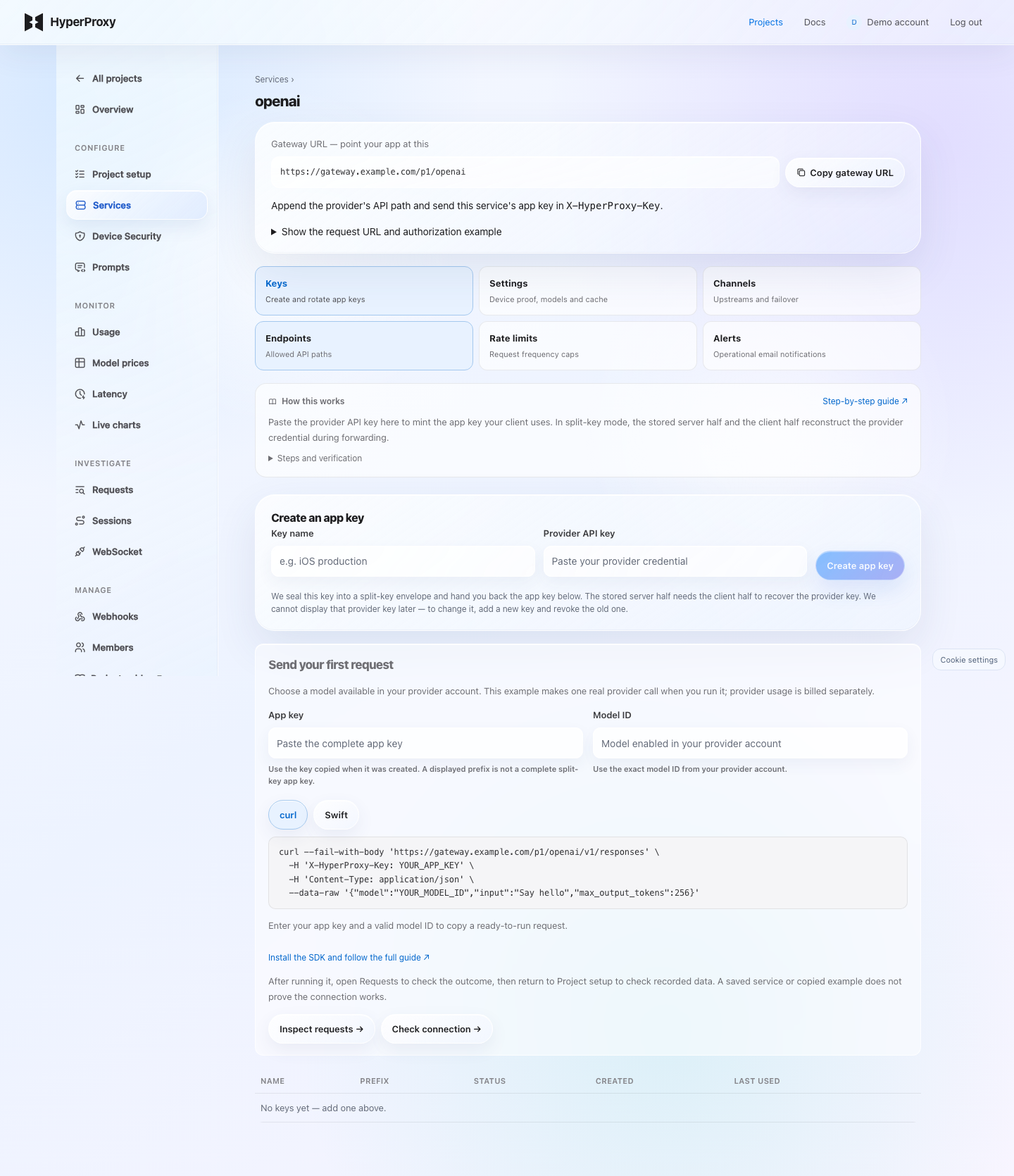
Click Add new service, copy its Gateway URL and open the service. Mint an app key in Keys. Append the provider's request path to the gateway URL; the URL itself does not authorize a request.
Check: the service appears in Services with the expected upstream. Send the provider-native request through its gateway URL, then inspect Requests. A template is a starting configuration; it does not promise the provider account has access to every API operation.
Provider key, app key, device proof
These serve different purposes. The provider key authorizes the upstream API. The app key authorizes this gateway service. Device proof adds verification of your configured application.
Gateway URL
App key with client half
Matching device proof
Stored server half
Access and usage checks
Provider auth injection
Receives provider credential
Processes the request
Returns its response
- 1Name and mint
Open Keys, give the key a useful name such as ios-production and paste the real provider API key. Click Create app key. In split-key mode, the server half requires the client half to recover that credential.
- 2Copy the app key once
Copy the full displayed value before leaving the page. Send it as
X-HyperProxy-Keyto this service's Gateway URL. Do not embed the real provider key or a server ingest key in the client. - 3Add protection and verify
An app key can be extracted from a distributed app. Configure device proof, endpoint/model access and rate limits, then check a real request. Split-key storage does not prevent all misuse of a copied client key.
- 4Rotate with a rollout window
Choose Rotate on an existing key, paste the provider credential again and select how long the old app key remains usable. Mint the replacement, ship it, then retire or revoke the old key after your rollout. Immediately ends its access without a grace period.
Send your first request: for OpenAI, Claude or Gemini, enter an exact model ID available in your provider account and choose curl or Swift. A newly minted key fills the example; returning to Keys requires your saved complete app key. Copy the request and run it from your terminal or app, then use Inspect requests and Check connection. Copying an example makes no provider call; running it incurs provider usage. Device-protected services show the matching protection guide instead of a plain curl command. Custom upstreams require their own API path and payload.
Shared key override changes the boundary. An override is encrypted at rest and used for every request to the service. An active app key is still required, but its client secret half is no longer verified: a displayed prefix is sufficient. Keep this distinction in mind when using Settings → API key override.
Keep the provider payload intact
Append the provider's path to the HyperProxy gateway URL. Replace the real credential with X-HyperProxy-Key.
$ curl -N "https://api.hyperproxyai.com/<project>/<service>/v1/chat/completions" \
  -H "X-HyperProxy-Key: hp_live_<project_id>.<key_id>.<client_half>" \
  -H "Content-Type: application/json" \
-d '{"model":"gpt-4o-mini","stream":true,"messages":[{"role":"user","content":"Hello"}]}'Two opaque segments select the project and service. They are identifiers, not credentials.
Native forwarding uses the provider's JSON, binary, SSE and WebSocket formats. Configured model, prompt or compatibility policies may update JSON fields.
The gateway reconstructs the provider key only in memory and injects the upstream auth scheme.
Verify it works
A successful provider response appears in Project → Requests with its status and request ID. Open Overview to check model, latency and cost coverage. An unknown model price is a coverage issue, not a zero-cost request.
Troubleshooting
401 or 403 before forwarding
Check that the app key belongs to this service, is active and has the required device proof. Keep the provider credential separate from the app key.
Provider rejects the body
Keep the provider-native path and JSON format. An OpenAI request body is not interchangeable with Anthropic or Gemini.
429 or missing cost
Inspect the error code for rate, budget or account quota limits. Incomplete pricing stays unknown; wait for final streaming usage before evaluating cost.
Next steps
1,000 requests per month shared across projects. No card required. Provider charges are separate.